查看: 3847|回复: 1

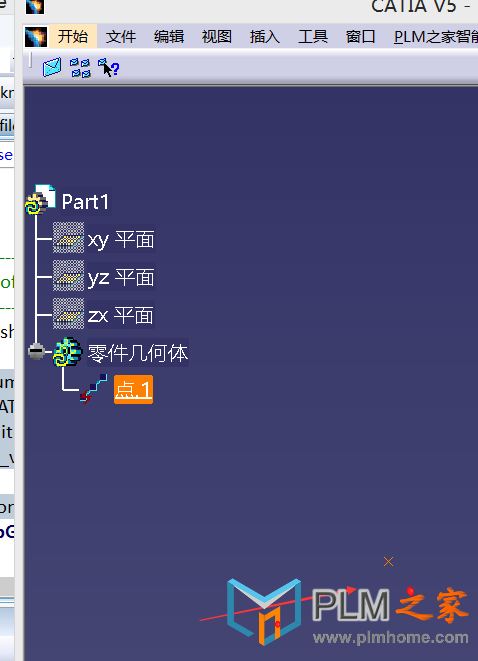
[原创] CATIA二次开发入门教程---18 创建一个点

[复制链接]

4

主题

3

回帖

44

积分

管理员

积分
44
发表于 2017-12-20 22:57:06 | 显示全部楼层 |阅读模式

请使用QQ关联注册PLM之家,学习更多关于内容,更多精彩原创视频供你学习!

您需要 登录 才可以下载或查看,没有账号?注册

×

" u2 s6 Q0 @! I) `( M8 a' C CATIA二次开发入门教程---18 创建一个点
" F2 \) g/ A9 Q0 n2 \# O8 k* x! [3 y
QQ截图20171220225607.png
7 x0 {6 E$ M$ |) [4 J. N8 G7 q# s) Y( b2 F7 c/ h+ @* p" n

, P% p* ^2 h4 |2 t[mw_shl_code=c,true]////////获得Editor、Document、Container、设置GSMFactory
# c/ M! _, k6 O/ w        CATFrmEditor* pEditor = CATFrmEditor::GeTCurrentEditor();
% D8 |  N+ y3 A* E( Z/ |        CATDocument *pDoc = pEditor->GetDocument();- i+ p1 _1 p) |. |' W9 I
        CATIContainerOfDocument_var spConODocs = pDoc;
& p; p! {4 j# k7 K6 G7 K
/ [* G! Z$ X8 @) r# @" t        CATIContainer*            _pContainer;                //Container
& C) d2 U' H. @! L$ T$ b; m        CATIGSMFactory_var        spGSMFactory;                //GSM工厂
8 F. I7 ~2 ^$ f3 u2 j  H, m! b" U+ ^! S( R% w
        _pContainer = NULL;
( A9 Z2 b, ^. g1 w. j; J# s        HRESULT hr = spConODocs->GetSpecContainer(_pContainer);4 j* ]( v' T3 N% l6 I" Z5 o
        spGSMFactory = NULL_var;
! p1 N) i  U3 s. n: A* {% \( V        spGSMFactory = _pContainer;% F; E0 G; _$ o# U
        //设置点的坐标7 H- A3 g% H. N: B8 r
        CATMathPoint _Point;
' \8 B7 y1 y; g' C0 G( K, E        _Point.SetCoord(10,10,10 );
4 ]3 c5 Z7 g- S        /////////////////////用以上得到的Point3D画点% z! N# ~/ d4 {2 f  F1 r. m2 |
        CATIGSMPoint_var spPoint1 = spGSMFactory->CreatePoint(_Point); //创建一个点
6 J6 k. J) y4 l        CATISpecObject_var                spSpecPoint1;9 m# }: T- o- ]  z% \! g' X
        spSpecPoint1 = spPoint1;                                //Casts the point as a CATISpecObject
) I/ |6 w- n6 W7 m1 }5 U        CATIGSMProceduralView_var spSndPntObj = spSpecPoint1;
  X/ {0 p& F" S; @7 i) S' u" I        spSndPntObj->InsertInProceduralView();$ E9 R, }) U. W
    spSpecPoint1->Update();* ?) u( @& ^3 K. A) i6 b
        // Add your code here[/mw_shl_code]' h" r4 _4 U  X+ K: @7 O
上海点团信息科技有限公司,承接UG NX,CATIA,CREO,Solidworks 等CAx软件,Teamcenter,3D Experience等PLM软件,工业4.0数字化软件的实施\二次开发\培训相关业务,详情QQ 939801026 Tel 18301858168 网址 www.doteam.tech
回复

使用道具 举报

4

主题

3

回帖

44

积分

管理员

积分
44
 楼主| 发表于 2017-12-22 11:04:14 | 显示全部楼层
在创建任何几何对象之前,必须在激活的函数命令中添加以下代码,:
CATFrmEditor* pEditor = CATFrmEditor::GetCurrentEditor();
if(pEditor == NULL)
{
   printf("error getting the FRMeditor");
}
CATDocument *pDoc = pEditor->GetDocument();
CATIContainerOfDocument_var spConODocs = pDoc;
CATIContainer* pSpecContainer = NULL;
HRESULT hr =spConODocs->GetSpecContainer(pSpecContainer);
if(spConODocs == NULL_var)
{
   printf("error getting thecontainer of documents");
}
以上代码的主要功能是获取editor, the document and the container。
CATIGSMFactory_var spGSMFactory = NULL_var;
CATIPrtFactory_var spPrtFactory = NULL_var;
CATICkeParmFactory_var spParmFactory = NULL_var;
spGSMFactory = pSpecContainer;
spPrtFactory = pSpecContainer;
spParmFactory = pSpecContainer;
以上代码设置工厂,在这基础上你才可以造型,GSMFactory用于创建底层的几何对象比如点、线等。PrtFactory包含创建孔特征、拉伸特征实体等函数。ParmFactory 包含设定参数的函数。
在以上的基础上可以创建点了,步骤如下:
1)创建一个三维数组(x,y,z)定义点坐标。
double Coords[3];
Coords[0] = 0;
Coords[1] = 0;
Coords[2] = 0;
2)创建一个CATIGSMPoint并将其转换为CATISpecObject
CATIGSMPoint_var spPoint1 = spGSMFactory->CreatePoint(Coords);//Creates a point

# q6 B4 b9 R$ A% }3 `3 E) ]
CATISpecObject_var spSpecPoint1 = spPoint1; //Casts thepoint as a CATISpecObject
3)为了在CATIA显示你创建的点,必须将其添加到视图中。
spSpecPoint1->Update();
CATIGSMProceduralView_var spPntObj = spSpecPoint1;

: m  n1 ?7 e" |
spPntObj->InsertInProceduralView();

  X' t, ]1 g# r2 ^$ |' B( w3 x
上海点团信息科技有限公司,承接UG NX,CATIA,CREO,Solidworks 等CAx软件,Teamcenter,3D Experience等PLM软件,工业4.0数字化软件的实施\二次开发\培训相关业务,详情QQ 939801026 Tel 18301858168 网址 www.doteam.tech
回复 支持 1 反对 0

使用道具 举报

您需要登录后才可以回帖 登录 | 注册

本版积分规则

在本版发帖
关注公众号
QQ客服返回顶部