PLM之家PLMHome-工业软件践行者

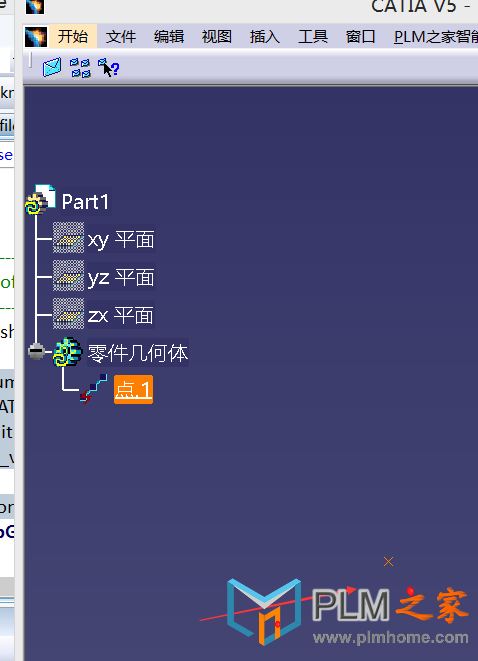
[原创] CATIA二次开发入门教程---18 创建一个点

[复制链接]

2017-12-22 11:04:14 3650 1

admin 发表于 2017-12-20 22:57:06 |阅读模式

admin 楼主

2017-12-20 22:57:06

请使用QQ关联注册PLM之家,学习更多关于内容,更多精彩原创视频供你学习!

您需要 登录 才可以下载或查看,没有账号?注册

x
4 X; E5 `. a( T1 @5 w) F6 A
CATIA二次开发入门教程---18 创建一个点
+ x1 u, z2 [/ j2 X+ H% c3 H+ v; z4 |8 X: N' X" N
QQ截图20171220225607.png
( k" o2 h$ Z$ {8 Z2 F
1 C4 |9 A. v+ B$ F  [# N. D* B' B2 i
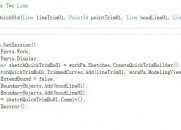
[mw_shl_code=c,true]////////获得Editor、Document、Container、设置GSMFactory0 ^4 Z, ^0 Y1 @' b, b
        CATFrmEditor* pEditor = CATFrmEditor::GeTCurrentEditor();
2 X! N# Q; O$ T) y9 I+ {        CATDocument *pDoc = pEditor->GetDocument();0 V9 `( t: W/ w( U& F# }
        CATIContainerOfDocument_var spConODocs = pDoc;
. ^" \1 [: m4 X4 \: {) C- _4 R" N0 c& j7 g& b+ p5 ~, g) J
        CATIContainer*            _pContainer;                //Container
7 a' w! n1 ^  q( A        CATIGSMFactory_var        spGSMFactory;                //GSM工厂* v3 l3 b3 t8 O5 w

' K) n) [5 Y0 b- g4 x        _pContainer = NULL;5 A  u6 V9 a" _3 Z
        HRESULT hr = spConODocs->GetSpecContainer(_pContainer);0 o0 x7 z: P1 q2 x
        spGSMFactory = NULL_var;
  _2 B0 a1 p9 y        spGSMFactory = _pContainer;
: g- H1 z1 u; v1 C: w5 L        //设置点的坐标# }( N. o9 N+ H5 i; p: \; X6 M; t0 j
        CATMathPoint _Point;8 h/ @6 P1 S' v) i& d
        _Point.SetCoord(10,10,10 );7 J7 J8 r8 y6 \! [7 ^; M
        /////////////////////用以上得到的Point3D画点3 M1 ~( d( B. {. s5 X; \& X$ ~
        CATIGSMPoint_var spPoint1 = spGSMFactory->CreatePoint(_Point); //创建一个点
: [( L7 X( i1 n! S        CATISpecObject_var                spSpecPoint1;! \; Z3 n% H+ m- H
        spSpecPoint1 = spPoint1;                                //Casts the point as a CATISpecObject7 Y" @: ]' L" g; ]. l0 e
        CATIGSMProceduralView_var spSndPntObj = spSpecPoint1;
% p2 C& W6 Q) o3 C% d1 X        spSndPntObj->InsertInProceduralView();4 W6 N4 l) R5 X5 Z
    spSpecPoint1->Update();
6 S; `- L3 J9 _. ~        // Add your code here[/mw_shl_code]$ T# j4 h1 p+ Y  `
上海点团信息科技有限公司,承接UG NX,CATIA,CREO,Solidworks 等CAx软件,Teamcenter,3D Experience等PLM软件,工业4.0数字化软件的实施\二次开发\培训相关业务,详情QQ 939801026 Tel 18301858168 网址 doTeam.tech
回复

使用道具 举报

全部回复1

admin 发表于 2017-12-22 11:04:14

admin 沙发

2017-12-22 11:04:14

在创建任何几何对象之前,必须在激活的函数命令中添加以下代码,:
CATFrmEditor* pEditor = CATFrmEditor::GetCurrentEditor();
if(pEditor == NULL)
{
   printf("error getting the FRMeditor");
}
CATDocument *pDoc = pEditor->GetDocument();
CATIContainerOfDocument_var spConODocs = pDoc;
CATIContainer* pSpecContainer = NULL;
HRESULT hr =spConODocs->GetSpecContainer(pSpecContainer);
if(spConODocs == NULL_var)
{
   printf("error getting thecontainer of documents");
}
以上代码的主要功能是获取editor, the document and the container。
CATIGSMFactory_var spGSMFactory = NULL_var;
CATIPrtFactory_var spPrtFactory = NULL_var;
CATICkeParmFactory_var spParmFactory = NULL_var;
spGSMFactory = pSpecContainer;
spPrtFactory = pSpecContainer;
spParmFactory = pSpecContainer;
以上代码设置工厂,在这基础上你才可以造型,GSMFactory用于创建底层的几何对象比如点、线等。PrtFactory包含创建孔特征、拉伸特征实体等函数。ParmFactory 包含设定参数的函数。
在以上的基础上可以创建点了,步骤如下:
1)创建一个三维数组(x,y,z)定义点坐标。
double Coords[3];
Coords[0] = 0;
Coords[1] = 0;
Coords[2] = 0;
2)创建一个CATIGSMPoint并将其转换为CATISpecObject
CATIGSMPoint_var spPoint1 = spGSMFactory->CreatePoint(Coords);//Creates a point
" z4 h/ ]. n/ H& w
CATISpecObject_var spSpecPoint1 = spPoint1; //Casts thepoint as a CATISpecObject
3)为了在CATIA显示你创建的点,必须将其添加到视图中。
spSpecPoint1->Update();
CATIGSMProceduralView_var spPntObj = spSpecPoint1;

/ `$ y( U* l8 i  L( ^# S" {2 G$ `2 }
spPntObj->InsertInProceduralView();
+ A; y0 V. ?/ [. o' q9 i
上海点团信息科技有限公司,承接UG NX,CATIA,CREO,Solidworks 等CAx软件,Teamcenter,3D Experience等PLM软件,工业4.0数字化软件的实施\二次开发\培训相关业务,详情QQ 939801026 Tel 18301858168 网址 doTeam.tech
回复 支持 反对

使用道具 举报

发表回复

您需要登录后才可以回帖 登录 | 注册

返回列表 本版积分规则

  • 发布新帖

  • 在线客服

  • 微信

  • 客户端

  • 返回顶部

  • x
    温馨提示

    本网站(plmhome.com)为PLM之家工业软件学习官网站

    展示的视频材料全部免费,需要高清和特殊技术支持请联系 QQ: 939801026

    PLM之家NX CAM二次开发专题模块培训报名开始啦

    我知道了