|
|
请使用QQ关联注册PLM之家,学习更多关于内容,更多精彩原创视频供你学习!
您需要 登录 才可以下载或查看,没有账号?注册

x
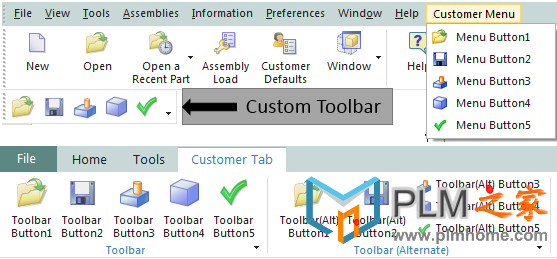
关于NX二次开发,经典界面到RIbbon界面转换的菜单开发技巧
4 ?; z; u( k( f* h
经典界面到RIbbon界面转换
 . ^6 g& k: z8 z% M: J; u' s
在经典界面下,需要的文件
9 M" C$ p1 t ?- J- customer_men.men
- customer_toolbar.tbr
' g- F0 M6 G( O' w0 k0 x0 [
在ribbon界面下你可能需要的文件
f: U0 z/ ?: H7 ^' p4 e3 f/ S" O2 s# e: [6 a6 N
; P$ s2 ]' l2 n8 B, e! H5 l( \/ e; e举例如下:: w+ f7 D8 O1 i( L; f4 }/ Y- M: v
6 C# Z% X- }( P# n7 U
% D$ o) C) a" `' z( ]. mcustomer_men.men
4 }3 q$ _; c* [* _!8 r. n' r" w8 v' `. T: {
! Customer menu file
, L1 H, q; I& B# A- i' o% n2 k5 E! ) \" s* w7 R: Z+ k* z+ L1 w
! Contains button definitions to be used in % U; g) I& G: b) @- F& \ B( H
! toolbars and Ribbon files y' t; L. m1 V! b
!5 G( n5 {0 k' L8 o, X; R
' y9 ^; Q U8 {( W1 mVERSION 120
, p$ h% d) c4 c; H3 p3 x. k& _8 M
8 y9 G$ p" H! y8 ?' ?' g1 O# ]8 k; d- HEDIT UG_GATEWAY_MAIN_MENUBAR0 b( B; t# P l, P" w
5 Y3 ^7 J0 I7 r. @1 ~0 |) }0 H9 CTOP_MENU
! H# ]4 p8 q% k CASCADE_BUTTON CUSTOMER_MENU
( k3 J. q% r2 d7 |" I0 W. Y LABEL Customer Menu
% e o+ x( r2 R# ]# R0 q; {! O1 h4 I
END_OF_TOP_MENU8 @- o: @5 r( }( K! l; T3 p# x
! A; _# _ w% b. hMENU CUSTOMER_MENU
8 f+ k, p8 O% M' y. ]. a; w6 h3 g3 G7 V G3 x, K8 w: f
BUTTON CUSTOMER_BUTTON_1% I! Y2 G7 \& n# `
LABEL Menu Button1
$ z1 G! s; C: K' `% c RIBBON_LABEL Ribbon Button1( w* h( U+ Z5 D& E6 J. ]
TOOLBAR_LABEL Toolbar Button1
: m$ [ n/ J- W- E* o9 N BITMAP fileopen, A! n4 m0 U# E: r
. ^$ o. t b+ K% t% ?# B BUTTON CUSTOMER_BUTTON_2
+ K- G6 F, ^/ C2 A LABEL Menu Button2
0 M; _$ X- n$ p$ B7 J RIBBON_LABEL Ribbon Button2% ^1 ?& [" c S
TOOLBAR_LABEL Toolbar Button23 Z) |9 L! ~( [* Y# J
BITMAP filesave
Z: b6 k3 V; r# }) \% B9 H( u& f8 ]% w9 o- ~0 r4 w
BUTTON CUSTOMER_BUTTON_3
; @& x- K1 n1 p0 s- r LABEL Menu Button3( K' t( @, J- _' [& _
RIBBON_LABEL Ribbon Button39 X( [ G# [% j" E, c% G) }: H$ A
TOOLBAR_LABEL Toolbar Button3
! @( D' D2 A7 \0 v, A, k BITMAP current_feature6 {9 d1 h& R3 V* e5 c* | s
, x+ p1 ]; ?0 |- w: ~7 K3 k
BUTTON CUSTOMER_BUTTON_4
% C7 y0 j$ C/ e LABEL Menu Button4
0 B% W B V& B& Q" ^( H8 k5 m$ y RIBBON_LABEL Ribbon Button48 ~9 Y2 C9 A; N/ `! ^) _
TOOLBAR_LABEL Toolbar Button4
, O7 L! ^" T+ Z" y+ P k BITMAP block
, @0 B& E+ G- Q
. s6 P8 ?6 [" k( _: |& ^( W) A/ F, w BUTTON CUSTOMER_BUTTON_5. t3 c0 `, V) s& }3 T
LABEL Menu Button5
6 P* k) Y! W P5 E7 d RIBBON_LABEL Ribbon Button5. ]4 ]- Y6 F. Z* Z8 I7 q7 D
TOOLBAR_LABEL Toolbar Button56 ]8 }6 l4 u; C* x' ~, W
BITMAP checkgreen. D! E5 g/ n4 J h
U+ n- r# C- }) r3 w% ]# o; m
END_OF_MENU# \- r! ]* a% O: x2 E h, I
3 n* n! u6 Q5 R4 T; R
+ e% @' B3 Y. `) U r/ t/ M# f6 h6 T/ b6 |
customer_ribbon_tab.rtb
2 r7 {. e1 k& K. M) r+ f!' b+ |/ G: M1 F3 p* p4 m6 j
! Customer Ribbon Tab
* v% J6 ^7 n( {* t* Z, ]! ) b' i' R8 x5 B! U" c! K
! This file will create a new customer tab containing three groups and& c9 p/ T# i7 ` f' |- f3 c3 D
! one top level button.8 z/ ?# v e1 _
!" z7 ]" P z, D+ x$ F
5 Q9 K; i! h( l$ NTITLE Customer Tab
% R5 L: [% R0 b% { N: \VERSION 170" W- G% e0 }8 ~5 Q4 `
3 D y l4 |1 P" r
! The first group represents a Ribbon group that references an existing ! I0 h) j _7 `% S6 N
! toolbar with no Ribbon style changes.
5 ~. R6 H& w# J& ]2 b0 ?! a! % i2 T3 q" [+ m' }) i
! This is the quickest way to add existing toolbar content into Ribbon mode.
/ a2 }! Z4 P; ^. L' z!
8 _3 [5 ~, g' o3 A6 LGROUP customer_toolbar.tbr M5 \6 {6 J8 p$ [3 S ]# P
6 h" E9 d. F3 K
! The second group represents a Ribbon group that references an existing
* N3 _0 C& p! k- l* J( u! toolbar with Ribbon specific style changes added to it. There is no difference2 W0 h% h, j* G
! in how this toolbar is referenced in the .rtb file compared to the first
( i% r4 {% Z8 R8 U! toolbar as a group. The only differences from the first group exist within
$ P1 c& i' w6 y3 ~! the .tbr file itself.
* V- I6 u# a0 f5 R/ K" Z' u!) i) h _0 P2 L) N. ]; |& H$ f; Z
! This approach has advantages for customers that will deploy both Ribbon and
A2 @6 g! ^2 w1 b; s! Classic Mode customizations since all the content is defined in the .tbr
! N) U! e8 E6 X3 P. f! file and it will stay synchronized in both modes. Only one set of customizations
# J; Q8 z$ e' `0 T! will need to be maintained while still making use of RIBBON_STYLE to # Q8 `, }$ E' e4 q* J3 u0 T
! control the presentation of the buttons on the Ribbon.
" Z/ e u' o" u5 g1 \! R4 A!2 v& a' I9 q0 z7 w4 `
GROUP customer_toolbar_alternate.tbr
7 @; c( f* a: r5 X$ N
7 N7 t, |9 q2 H* J) c* ~! The third group represents a Ribbon group that has been created explicitly' w; s5 G) [' n& p2 b2 c% c7 O2 }
! as a Ribbon group and will not exist in Classic Toolbar mode. This is the
; h+ K) h& f+ T) l! preferred option since the user will be able to take advantage of all the
+ o* R8 @. w/ \! layout styles and containers offered by the Ribbon. ! y+ o& b `3 E v' e8 V) Q+ a
!
$ D, D6 t* u8 A/ \/ G; I: |8 Q3 _* O! For customers that will deploy both Ribbon and Classic Mode customizations, " t' k. n0 a2 q% S4 }
! this approach will result in no synchronization and two sets of customizations 4 O1 Y8 s9 I. C; ]+ n% w- d
! will need to be maintained.# X- V5 X, a0 F3 [" { e- h# k
!
; u; p( _6 [6 J+ C: b! A group can alternatively be defined directly inside the .rtb file by using the
( G# }1 V7 O& k0 J7 A9 ^% M& \! keywords BEGIN_GROUP and END_GROUP. , ]) R. a" _! W! b+ O
! Y7 Y& F4 F! K) P6 D
GROUP customer_group.grb: j6 w$ \( a4 H: B- I; S4 V
( W3 B* W2 D% ?6 i: h
! Example of a button that is placed directly on the Ribbon without being
$ S0 D' E7 ~7 S# R2 N; m# o. s! contained in a group. This is a simple way to add a button to a tab
' z5 S# o/ O; }, ?5 ?7 c! but is not recommended for many buttons since groups have advantages.
2 U. o4 R8 Y* X9 l. e!
! i1 d* { i* {' I5 T* }" I N2 r! A few advantages of groups: P8 R/ [. f3 K: }
! 1. Easier to move many buttons around together in quick customization. & ]6 q$ c- [5 H' W
! For example, MB3 on a group and choose "Add to Left Border Bar".
# ^4 T9 I* t( V. n [2 Y! This will move the whole group to a new location. If buttons are - j* _: y7 b- H
! not in a group, they need to be moved one at a time.
0 ]9 r3 }) g+ m" z/ [!: B; j) S2 Q3 U" }3 S8 t- g
! 2. Provide a label to describe its contents.- r9 s" O. _: q& z) V' ]4 f
!+ D9 u3 m6 z* W6 e. H9 C+ }
BUTTON CUSTOMER_BUTTON_1( l( V! a' z+ A3 u, P4 f7 G
LABEL Button1 Directly on Tab+ ]6 _' T( t* Z, n+ b \5 d
- K B0 U1 J8 n) H! O, i Q/ b( r" C4 j: m2 y
" M3 p/ X' k' Q' Q! J
customer_toolbar.tbr# c2 Z6 v* M2 T9 R/ A; L
!
) [4 U9 Q9 x% ^1 i% s* y, g! Customer Toolbar File, C1 s& |$ ~; W0 l5 ]' Z. l& m
!
* n" q; p; P( Z. X% m+ J, \! This is similar to an existing toolbar file containing! P: N! u8 C" [. S& L
! no Ribbon changes.: S. Q7 H" u7 C- r
!
q, W9 w4 I- F+ {( A! In Classic Toolbars mode - This toolbar will still show up in the + k+ _$ X% J( j/ l& j5 F
! toolbars list.
% |5 V# O' w- g& V!, f4 T( ]" U! n/ M- o
! In Ribbon mode - This toolbar will be automatically converted to a ' ~; I+ o7 S, _
! Ribbon group and will appear in the "Classic Toolbars as Groups"6 j& s' S+ w5 _/ X# W- V: D! g# P
! section in the Customize dialog.9 U f% U3 R* Q: d
! & m) ?* j2 m+ p2 Z" m
! h' q: c, ?) v" `
TITLE Toolbar
& W( |3 B% I# f2 iVERSION 170
7 J& _9 H, |3 v: @. v* B
" _. Y/ O& X6 I! X: Y; WBUTTON CUSTOMER_BUTTON_18 U% ^( g* G/ n( C1 a$ O" e
5 ~) R; U* U" ^. q `
BUTTON CUSTOMER_BUTTON_2( J/ A [. \7 [; H, j9 E6 H
0 p8 D, G6 e" U+ Q% l2 GBUTTON CUSTOMER_BUTTON_3, M9 B, B9 B9 L1 H" T6 P; p
, Y- y1 |" K% v: C. ~* K3 t& RBUTTON CUSTOMER_BUTTON_4
5 p/ _6 }# e: ?5 }0 U5 I, u1 }; g. e6 K8 _- K4 ~7 c+ P6 j
BUTTON CUSTOMER_BUTTON_5- a; v# o8 l; J- W9 J# N! l
4 K, W$ U& h: d# y* i) d1 ? z0 ~
: w/ f4 y+ f3 |2 P3 ^4 x5 k7 l% \8 B w9 J! z- @# E1 z
customer_toolbar_alternate.tbr0 z8 `( o8 s7 J- f
!
) {6 \2 o; s; G/ ^- r' q! Customer Toolbar File (Alternate)4 y: J- D8 ?# g& Y- w
!
, F/ H* g9 X5 a" \ Q! This is similar to an existing toolbar file with new
|1 g2 t( }9 b! Ribbon styles added.
) R9 a9 ], O! y) X H7 P9 H; f! : D+ i* R- b- {$ a
! The RIBBON_STYLE will be honored when the toolbar is loaded , g% e/ U& g ?: g, D. r
! in Ribbon mode as a group but will be ignored when the toolbar * d7 W7 _5 ?) I' y! o
! is displayed in Classic Toolbars mode.
# {9 C5 Z+ x, ~6 j( }3 H!$ L/ u! S% H& ^4 D% r# x
! In Classic Toolbars mode - This toolbar will still show up in the 6 h V# Y' q; E. K% y
! toolbars list.4 D' T: [: j' U$ [6 l
!
- q* {, d# D" Z( W7 M% U! In Ribbon mode - This toolbar will be automatically converted to a 6 l7 [9 H! s' m
! Ribbon group and will appear in the "Classic Toolbars as Groups"9 }/ P% L9 H) {! ?. {: D
! section in the Customize dialog.
8 n3 y/ h6 `* c3 I7 d!" [1 u3 {' n1 c& v' a, l1 y
# [4 Y, x$ Q: S1 B1 I* MTITLE Toolbar (Alternate)
; q+ m3 I% W |8 s5 x0 vVERSION 170
( i7 W \7 q) F. ^" f; { Y. Y# N2 q8 U' _- \5 W ^# ]
BUTTON CUSTOMER_BUTTON_1
' H4 M) g, }# fLABEL Toolbar(Alt) Button19 F; h6 X( Q$ W$ r9 h5 V+ K4 K
RIBBON_STYLE LARGE_IMAGE
) _2 P' x9 C- d, E2 s9 Z2 o) N5 G% E3 Q" I& K3 r* J0 \, X
BUTTON CUSTOMER_BUTTON_2" q% L' e# |3 ]9 E( A$ I- o- l4 k( c
LABEL Toolbar(Alt) Button2
; N& t0 [5 M1 D; KRIBBON_STYLE LARGE_IMAGE4 A4 C! w Z- J1 C& V
{& P( D5 |! E; C9 U
BUTTON CUSTOMER_BUTTON_3
1 l/ H: j2 M8 s; _% D0 J2 T- nLABEL Toolbar(Alt) Button3+ t9 f: a6 `6 a
RIBBON_STYLE SMALL_IMAGE_AND_TEXT( o! s2 y$ K5 j' h
3 ]: c6 k: B% X! R8 y5 ], D8 `4 N
BUTTON CUSTOMER_BUTTON_45 O( \# ~) p( n7 N8 K
LABEL Toolbar(Alt) Button4
" E# k: p2 h7 W: j: y7 R3 mRIBBON_STYLE SMALL_IMAGE_AND_TEXT
0 V5 R, S" L" k9 v0 K; B% v- g# W( i. S( J! I2 {
BUTTON CUSTOMER_BUTTON_51 i. `, |2 \5 R0 b' ~$ _
LABEL Toolbar(Alt) Button5, G1 [6 u$ G8 A$ \# K
RIBBON_STYLE SMALL_IMAGE_AND_TEXT8 [1 f, @4 \* D* M# ?
) J7 }! }3 v# M. O3 z
; d0 p4 [5 E. M% ^
8 N( U; ?' F& Gcustomer_group.grb8 o# \% s! D% ]- \- ?
!
4 ^ X5 d0 l: e, E! Customer Ribbon Group File
! n3 @, o8 \# k1 b!
$ l- N* a, \- ^2 T. P& `* v! In Classic Toolbars mode - This group will be unavailable
9 O! }( f4 w- x' i8 E!
- T, _* o* `* t: Z! In Ribbon mode - This group will show up in the "All Groups" list
) p- |4 F6 X1 b( B( \- j% I! in the Customize dialog.
$ y7 H& H3 B0 x!
1 k7 f7 x8 A9 l v- h5 `! The labels of the buttons are defined using the RIBBON_LABEL token in the MEN files) \7 p7 ^) l3 s, n9 @* p1 q* n
!. g1 [- u: E# b; f/ G0 h( A
9 ^ i% A# U, v# r& T+ dTITLE Group+ Q1 R0 p/ N2 X5 p% I2 X$ {
VERSION 170* T3 o3 I* J# W, S: U
. U E0 f5 k$ A9 Q! No LABEL defined, using RIBBON_LABEL defined in customer_men.men
9 w) Q U7 q1 k5 P7 F1 Q0 uBUTTON CUSTOMER_BUTTON_1' M+ q6 r/ |' S R
RIBBON_STYLE LARGE_IMAGE
9 X+ c; W, r! H/ } C# e6 n" S8 c: i* C0 R0 M3 G% V5 z, I9 v- g% _
! Example of a gallery defined in a GRB file.
( L5 g# m. c' w& N. R# y! / B( h% u) S: y
! If this gallery is to be used in other places, then it could be
1 e* [; N# _) c! defined in its own gallery (GLY) file and referenced here
0 p; m* C1 x) P" y6 s4 v( r+ Q6 e! Example:
5 D5 _4 T7 _- ], C! GALLERY customer_gallery.gly
$ h4 O( `" d1 _+ B, p0 e2 E0 U!
! D& [; X) b# ?, ?, i( K8 c2 xBEGIN_GALLERY CUSTOMER_GALLERY
$ L8 l ~9 E5 _3 J2 X- f' NCOLUMN_IN_RIBBON 2/ ?5 u& i: n2 `
COLUMN_IN_POPUP 2) y9 \7 _% T, E/ T# g
LABEL Gallery
' ?, J( G; X2 `* i' SGALLERY_STYLE MEDIUM_IMAGE_AND_TEXT# j" s, @! y7 ~, p% y
$ O) }8 @, u4 V6 y; L8 _ BUTTON CUSTOMER_BUTTON_2/ Z) W, e" k: t0 R& t% }7 K2 O
W2 C' K% I1 j$ b7 _. A( T# t BUTTON CUSTOMER_BUTTON_3& K; z4 k; G0 e) F) t
6 D G/ a1 b0 j6 P4 a* i; J3 r
BUTTON CUSTOMER_BUTTON_4 D7 I2 b, ]# C- g: h
8 C" l* L9 w1 P( a BUTTON CUSTOMER_BUTTON_5. ]8 |2 k" ~" }3 R% t; R& ^( z
) D1 p4 H8 x7 g+ G
END_GALLERY
: H& B7 v; X' N; k% g/ \
9 I; g+ M/ E1 W
: D1 A! E" S0 a2 f+ ?9 Z |
|





 |小黑屋|手机版|PLM之家-专注工业软件生态建设,大模型CAD创新生态







