|
|
请使用QQ关联注册PLM之家,学习更多关于内容,更多精彩原创视频供你学习!
您需要 登录 才可以下载或查看,没有账号?注册

x
0 I, B- ]8 D- H2 t/ Q) m3 o
$ I: H: v* V) f
: k' I4 m% r, o3 d, F( C" W, W4 b
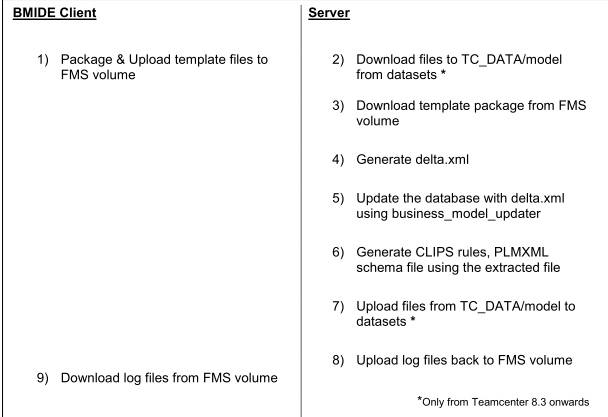
Teamcenter BMIDE热部署原理和步骤
 8 P* }# H- ~" M
Let‘s understand these steps in detail.
1 R8 j* T* R, T# [" v5 Q1) Package & Upload template files to FMS volume 1 z- f0 D$ B) ^* m+ m0 k
a. In this step the BMIDE client will generate the new version of the template package and upload this
% K: A( ~2 ^' r4 G1 x3 ipackage to FMS volume using a SOA. ! W* B, l$ D. E% O, a0 l$ @
2) Download files to TC_DATA/model from dataset (Applicable from Teamcenter 8.3 onwards) 8 N- ^) {, V8 y# T& {
a. In this step, we download files from the dataset instead of relying on files residing in TC_DATA/model H2 C/ v6 i J- D# r7 C, v
folder. For details see section titled ―Storage of TC_DATA/model files in dataset‖ # g3 w b6 O) W, E" o5 c; n: O! |
3) Download template package from FMS volume
1 Z' Q2 T5 f' C8 q% g* W# A2 qa. In this step, we download the latest version of the template that the BMIDE client uploaded to FMS
# Y$ A# S) C |3 d2 |" G xvolume.
: [. c% w6 j# U" I. n% o: i9 m4) Generate delta.xml " m) \6 k: V+ g- u
a. In this step, the delta.xml is generated using the files in TC_DATA/model
v& F' m4 q. ?3 b! ?% c! x. Ji. Copy model.xml to model_backup.xml 0 v& K% w, V) z" }( N
ii. Copy model_lang.xml to model_backup_lang.xml
* w( W% R x$ X* m" S0 C- j6 \iii. Consolidate template listed in master.xml to model.xml and model_lang.xml
2 x+ Y9 O; X+ h6 n0 M7 }iv. Load model_backup.xml and model_backup_lang.xml as old model
# Z. E& `. v+ \+ X% D5 |0 Kv. Load model.xml and model_lang.xml as new model
0 a3 H0 Y6 J* G( Xvi. Compare and generate delta.xml 2 M I+ x$ d/ \, _
3 I1 c% v* w% `7 |! r' o
; k1 m3 t9 ~% w/ ]b. Teamcenter 8.3 onwards, if any errors occur during this step, we restore all files in TC_DATA/model
+ ^ O; I3 C5 y Bfrom datasets ( except for model.xml and model_backup.xml)
$ Y3 s$ ^! q, G2 z \% @5) Update the database with delta.xml using business_model_updater 8 z: w Q8 ?+ [2 @, H
a. This is the step where the database is updated with the new data model. The utility
0 X5 D8 @$ B }, f5 z: V# Q) f! hbusiness_model_updater updates the database with the contents delta.xml. , h& r" Y" Z, @) C3 _6 U
b. If the update of the database fails, the contents of database will be extracted into model.xml and " y7 B( J. \" e/ ?9 g
model_lang.xml 4 i7 U& U8 O' Z4 |
6) Generate CLIPS rules, PLMXML schema file using the extracted file / x3 r' n$ L* O# M
a. The CLIPS rule file is re-generated if any Condition definitions were updated
$ o2 O8 h! s( n" I0 U/ hb. The PLMXML XSD is also re-generated ( w; \7 V5 K8 X: f! i
7) Upload files from TC_DATA/model to datasets (Applicable from Teamcenter 8.3 onwards) c _& \3 e; j4 e: z4 {
a. Finally the contents of TC_DATA/model folder are uploaded back to datasets to ensure it is in sync
* B) S, l: u" S& j9 cwith the database $ {4 @& V7 {1 ~$ [ n* i
8) Upload log files back to FMS volume
2 a( z0 r) e, K, k6 I5 M+ ea. All deploy log files are uploaded to the FMS volume
# |; N& w6 c7 C6 j- }/ k9) Download log files from FMS volume
9 J9 f* i6 A. ]7 sa. BMIDE client downloads log files to the client after deployment completes. ) t. x. L7 R I1 W) `
! L( Q0 a( W, Y( e4 Q/ t |
|






 |小黑屋|手机版|PLM之家-专注工业软件生态建设,大模型CAD创新生态







