|
|
请使用QQ关联注册PLM之家,学习更多关于内容,更多精彩原创视频供你学习!
您需要 登录 才可以下载或查看,没有账号?注册

x
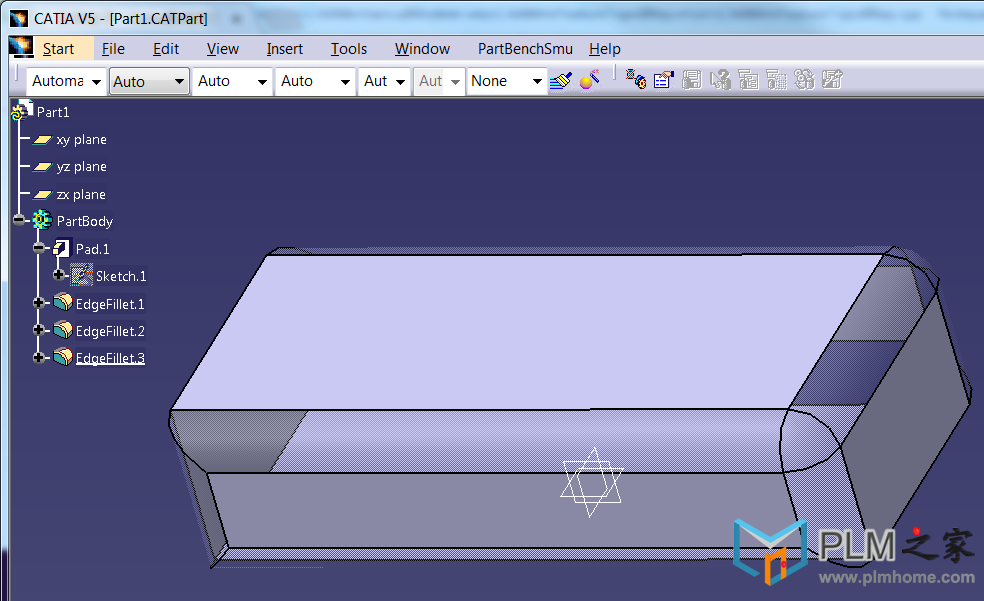
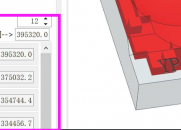
" i+ i( R" c' n6 s4 iCATIA二次开发源码分享: 获取所有的圆角类型并着色
" U8 |' c* N' F: X+ |" k, k7 t3 J本部分主要学习如何对特征进行颜色标记处理!
7 \! q% q, @5 [; _7 T; T
 1 v' H, h6 b5 a0 t! m
重要的是思路,通过CATIPrtPart 获取CATIDecendants接口,在这里可以设置要查询的类型,通过获取的特征得到特征对应几何的Brep信息,从而可以调用可视化的方法进行颜色处理!对于CATVPMesh的类型主要可以处理颜色和透明度。2 W* T2 L1 d7 A; j. {7 W
3 p! T% z0 F" `
[mw_shl_code=c,true]{
* L( ]+ i* f/ Y w. i$ {6 o) V E' b; Q; l0 s$ D: ~3 O
// Begin of User Code
4 r4 b- H, G7 ~( f4 ^* [3 a7 \+ {6 n6 k4 V7 L
CATFrmEditor *pEditor = CATFrmEditor::GeTCurrentEditor(); H8 o7 S( C+ X' a4 p9 t$ I+ I
if (NULL == pEditor)8 q! m4 s3 S( b+ Q* W
{
% C* N8 @$ M9 V printMessage("No Editor");
1 b0 P; T* c& \* G+ |/ c return;
8 V, h6 u! P' ~* ~6 Z }( k: B6 H- f1 s+ V4 G5 E
CATDocument *pDoc = pEditor->GetDocument();: d" B' _* y' z: L" b( K c. B, z
if (NULL == pDoc)
2 \, ^3 Q9 k: ~! E) J( a0 f* X& E {: X* l. x f# N5 s( M+ ^
printMessage("No Doc");3 J3 b& e$ }6 p( e+ [" u
return;
8 E ^: c4 @$ c: ~ }3 R8 v' x; G8 d' E7 ?7 l1 s, j
//CatInit# ]7 H: c8 D6 r% t- B
CATInit *pDocAsInit = NULL;
. ~% r" W3 x6 g, v; D HRESULT rc;
$ U% @3 v) h1 @3 j7 E# y rc = pDoc->QueryInterface(IID_CATInit,(void **) &pDocAsInit);
' [/ E) }5 D& | if (FAILED(rc))
1 C( {% k/ N# O/ m6 ` {
" C) o# }: E8 M" V- N printMessage("Can't get the document data");
: p: A, I- K: R8 |9 F% w return;$ e) a7 I% L% x$ e' L+ d- H
}+ X1 k0 C. L5 U& ^: f
//get the root container! p$ q* q9 j( Y7 i
CATIPrtContainer * pPrtContainer = NULL;. C. ?( S3 \, m: u
pPrtContainer = (CATIPrtContainer *)pDocAsInit->GetRootContainer("CATIPrtContainer");& V0 E" J& j+ Z1 i0 n: D
if (NULL == pPrtContainer)" c6 G8 I$ [ C% M5 \
{
( A8 g3 c: U( W) {* f) s printMessage("Can't get the mechanical Feature");
2 t5 Z6 e& V: [ J( W return;
5 K( P" w, H0 b0 i3 t }
5 u: O/ N7 ~. u2 M5 g! Z pDocAsInit->Release();
4 `1 z' A$ K9 ] pDocAsInit= NULL;8 I4 o. U- z+ h) l6 Y
( j- o$ }% ^- q$ e7 J) r! B
// get mechnical part
7 f6 B* U( R5 g% X! x/ z) G( v4 O9 o CATIPrtPart_var spPrtPart = NULL_var;
& P8 }. a- c6 W5 m7 N spPrtPart = pPrtContainer->GetPart();' j! S9 b. |0 ^! i4 V, o
if (NULL_var == spPrtPart)
3 q. F$ l. o; G) g3 r {4 J# u! l7 O7 f, a8 P0 I$ u+ d, t
printMessage("Can't get the mechanical Part");
" i% w- S2 E1 x: q$ c6 G* f return;4 s) J4 Q. ^: b: P9 M
}
o5 [, a5 Q, c& @ pPrtContainer->Release();% d/ w' v$ L& U: `9 ]- S3 d2 N
pPrtContainer = NULL;2 u2 h7 C C( t+ k; K0 j
//get the CATIDecendants
" R/ I" f* ]1 N
; r, D3 z x4 c# o% o Z0 }7 f CATIDescendants *pDescendants = NULL;
s0 B5 e$ b% }: }" r) i rc = spPrtPart->QueryInterface(IID_CATIDescendants,(void **) &pDescendants);
) J1 i D- g, P* `- w if (FAILED(rc))
/ o$ p) c' d/ e! R$ m# [ {6 z0 G. T. e/ O/ c
printMessage("Can't get the CATIDescendants");
* P6 s$ f5 T3 o+ ]: j return;
2 _, B8 [% p! M3 X; B' E }
. U; k g5 N" X9 W$ O( R# p CATLISTV(CATISpecObject_var) spFilletFeatures;: T2 ]3 E/ y3 s0 h
pDescendants->GetAllChildren("CATIFillet",spFilletFeatures);
2 \7 l# h5 s( j for (int currentFillet = 1; currentFillet <= spFilletFeatures.Size();currentFillet++)
# Y0 E( i1 |, x+ n ` m! E {
4 _3 l6 o& j+ W# {$ l1 c5 i CATISpecObject_var spCurrentFilletFeature = spFilletFeatures[currentFillet];" @5 ]+ w, I- P8 M) _! y, L# D
if (NULL_var != spCurrentFilletFeature)
5 Z# e( Y1 @; T9 Z5 Y. T3 K7 R {* B% i" d8 o4 M! e( v
//get the name alias and print
8 o' i i( i2 D6 K0 C- m( R0 e CATIAlias_var spAlias = spCurrentFilletFeature;
3 F1 [% M o' c; b" {7 F if (NULL_var == spAlias)
9 t1 `- r5 e' C3 l/ _% G7 k& f {
4 p7 t7 S2 E, i" E( e continue; `! J- k4 u# n7 f
}+ N M' l" z% f7 p' L
CATUnicodeString filletName = spAlias->GetAlias();4 R* G: ?' h9 i# M, J) A
//printMessage();
- h, F- e+ F! x) Q' X _SelectorList1->SetLine(filletName);5 J* m E2 Q7 ?( b
//get the Brep of the fillet
8 S7 K) N3 M T1 H. ]# P( j: H CATIMfGeometryAccess *pMfGeoAccess = NULL;( Y) \3 u7 x) q, z8 U
rc = spCurrentFilletFeature->QueryInterface(IID_CATIMfGeometryAccess,(void **) &pMfGeoAccess);* O5 m2 ^' }1 t( r" W1 o* R
+ Q c u( ^; G
if (SUCCEEDED(rc))
, b( R( K. y+ f' U J8 J {, h9 I$ B( }7 |! y8 q+ ~) S% [
CATLISTV(CATBaseUnknown_var) spOBreps;9 ~; S0 X# \& {- p. K% I5 p
pMfGeoAccess->GetBReps(spOBreps);! O# W7 x' v' K/ ?6 \
for (int i = 1; i <= spOBreps.Size();i++)3 j5 x, A( f+ K- v5 j) E
{& q" |% ], \: l9 b+ {
CATIVisProperties *pfilletBrepAsGraphics = NULL;+ d: |8 F! g8 m4 S4 F+ X
CATBaseUnknown_var spCurrentFillet = spOBreps;4 Y* o- V* Y$ q1 e# c- B
if (NULL_var != spCurrentFillet)
' q4 e# h# ?/ c& q# V5 B {
. z" ]3 I. S8 U! F& \ ~0 f+ S rc = spCurrentFillet->QueryInterface(IID_CATIVisProperties,(void **) &pfilletBrepAsGraphics);' n6 n2 f6 G* P" j3 q3 m
if (SUCCEEDED(rc))
# {% G2 @* r" U4 b6 J. q6 W9 n {
! [, n- b8 j4 x1 t: M7 Q E CATVisPropertiesValues colorValues;
; r& N' c. o6 `# S% R colorValues.SetColor(0,255,0);//green
& u, ]/ K) [8 d* i! ?( j; D1 l colorValues.SetOpacity(50);" `' @/ n7 v0 ~0 g- ~
pfilletBrepAsGraphics->SetPropertiesAtt(colorValues,CATVPColor,CATVPMesh);. Z6 ?: o6 q2 k o! _
pfilletBrepAsGraphics->SetPropertiesAtt(colorValues,CATVPOpacity,CATVPMesh);
5 c U0 T( p" ?5 u pfilletBrepAsGraphics->Release();% B4 q7 A, @; z- v) U9 o) A
pfilletBrepAsGraphics = NULL;
9 e1 U( ?& [+ P0 |0 i1 K3 y4 u }
4 F0 a+ k) n% B! c }! G5 t6 `1 v5 _" a/ X
}+ g/ u; M( o) X& X- d' k
pMfGeoAccess->Release();
+ K9 o3 \0 Q% C3 p! E& [" Y pMfGeoAccess = NULL;
4 z$ Y+ ^- A1 q6 \( _1 ] }
1 }9 q9 ~# ~9 t. ` }
3 L) r# t& R" r }; ?; B# [; N4 m1 l4 O" A- l
pDescendants->Release();: t; d' i9 m7 A# u
pDescendants = NULL;* d% g; h; T8 E! [& \4 q; Z0 J7 N
// End of User Code
6 d+ b- P6 Z- ]0 q! Y% U: f: b7 @* ]2 X1 B/ s+ l4 N
}[/mw_shl_code], ^# n' ] a( `2 r+ n- J
|
|







 |小黑屋|PLM之家-专注工业软件生态建设,大模型CAD创新生态






 发表于 2018-1-12 16:57:11

